1st grade technology activities

The sandwich robot rebuilt so 1st graders hunt down the broken step, five more activities by standard, a free sheet, and the CSTA standards each one teaches.

Who we are. Mission.io makes Missions: teacher-led, whole-class simulations where students use what they’re learning to work through a real scenario together.

Everything on this page works without us. The standards each one teaches are at the end, with the two Missions that run in 1st grade. (In Botspace Boys, the Infini-D’s communication system can receive but can’t send, so the crew creates a light device to get RALF’s parking ticket number to Taipan’s air control.)

On this page

What 1st grade technology looks like

First grade technology activities are computer science written in sentences: a team writes the steps, a classmate follows them to the letter, and when the program stalls, somebody has to point at the step that broke it. This page teaches five of the CSTA computer science standards for grades K to 2 (level 1A), plus a first sort of what’s ok to share.

Plenty of 1st grade searches for technology activities mean the device itself: logging in, using a mouse or a touchscreen, typing a name, knowing what to keep to yourself. This page covers the computer science half and that one sort. For everything else, Common Sense Education’s digital citizenship lessons and CS Unplugged are free, and the ISTE Standards for Students (Digital Citizen, Computational Thinker, and five more) name the skills.

First grade sits in the middle of the K to 2 band. The activities here teach showing the same data more than one way (1A-DA-06), using numbers or symbols to stand for information (1A-AP-09), writing sequences with simple loops (1A-AP-10), breaking a task into precise steps (1A-AP-11), and debugging (1A-AP-14). Over the three years, the band also covers creating and following algorithms, planning a program, passwords, and working responsibly online. The codes come from CSTA’s 2017 standards, the set Code.org’s lessons cite, and CSTA put out a PK-12 revision in 2026.

Most teachers have seen the video: the teacher plays the robot, the jar sits unopened on the loaf, and the room cries laughing. The ruined sandwich gets the laugh, and nobody had to find the bug. Debugging begins when one six-year-old points at step 3 and says the word it’s missing.

Six things that make the sandwich robot CS

Collaboration is written into the standards. CSTA lists seven core practices for computer science, and collaborating around computing and fostering an inclusive computing culture are two of them, alongside testing and refining a program (CSTA, 2017). Thirty children shouting at one robot never get there; three children with three jobs and one strip do.

  1. 1. A real problem with stakes the class can feel.

    “Make a sandwich” is a joke. “Make lunch for a friend who can’t have jelly, and the bread runs out after two tries” is a problem.

  2. 2. Apply, don't recall.

    A second run where the team fixes only the broken steps and leaves the rest alone. It works only if they can read their own strip and find where it went wrong.

  3. 3. Group goals with individual accountability.

    The one the usual version misses: the teacher is the robot, and the class shouts. When the group shared a goal and each student answered for a part, 84% of studies found a positive effect; without both, 17% (Slavin, 1991).

  4. 4. The teacher leads the thinking.

    Three questions beside the strip (what does this step tell the robot to do, exactly; where did the robot freeze; what one word fixes it) get more debugging out of a 1st grader than a worksheet of mixed-up steps.

  5. 5. A debrief where the class argues it out.

    The sandwich is the setup. The talk afterward, about the step that worked and the step that didn’t, and what made the difference, is debugging said out loud (1A-AP-14).

  6. 6. A way to see who did what.

    If the tally can’t show who wrote a one-action step and who spotted the missing word, all you’ve graded is a paper sandwich.

Find the broken step. Fix only that one.

The sheet at the end of the next section has the step strip with a bug circle for every step, the fix box, and the paper props to cut out. Get the sheet →

The sandwich robot, rebuilt for 1st grade (1A-AP-14)

Students write step-by-step instructions for a peanut butter and jelly sandwich (or sunflower butter), and a robot follows them literally, with the jar unopened and the knife on the wrong end. EU Code Week and Microsoft MakeCode both publish it, and it works in 1st grade because the steps are sentences the children can already write. The usual run makes the robot’s mistakes the joke. This one makes finding them the job, with all six in.

Time
40 minutes, its real length.
Groups
Threes. With 24 children, eight groups of three exactly.
Supplies
Paper props per group (a plate, two bread slices, a jar with a lid flap, a banana, and a craft stick knife), with the step strips on the sheet, so no food or allergens come into the room. About $2.
Standards
1A-AP-14 (find and fix errors in a sequence), with 1A-AP-11 (break a task into a precise sequence of instructions) for the writing.
  1. Teach first, 8 minutesApply

    Ask the class for the first step of a sandwich and do exactly that, literally. When “put the peanut butter on the bread” leaves the jar sitting on the loaf, stop and name the idea: a robot does only what the step says, so each step has to say exactly one thing. Then name the second idea: when it goes wrong, find the step that’s wrong and fix only that step. A bug, and a fix.

  2. The problemStakes

    The class robot (a teammate) has to make lunch for a friend who’s allergic to jelly and gets only sunflower butter and banana. There’s bread for two tries, so the robot has to get it right by the second one. The program has to be good enough that a robot who can’t think makes a sandwich the friend would actually eat.

  3. Three roles, one job eachAccountability

    On the cards, with names on them. Writer and Robot swap for round two.

    • Writer

      The only pencil on the step strip. Writes each step as one action in one sentence.

    • Robot

      Follows the steps with the props exactly, one step at a time, and freezes when a step can't be done.

    • Bug Finder

      Watches the Robot, and at a freeze, points to the step number that's wrong and says what's missing.

  4. You lead the thinkingTeacher leads

    Three questions, next to the strip: What does this step tell the robot to do, exactly? Where did the robot freeze, and which step is the bug? What’s the one word you’ll add to fix it? Resist reading the strip for them. The Bug Finder reads it.

  5. Two rounds, and the second-try ruleApply

    Round one: write 6 to 8 steps and run the robot until it finishes or freezes. Round two: fix only the broken steps, not the whole strip, and run it again. Writer and Robot switch between rounds.

  6. The debrief, 8 minutesDebrief

    On the rug, two strips under the camera. Where did most robots freeze, and what was missing from that step? What’s the difference between the step that worked and the step that didn’t? Who in your group found a bug before the robot froze? Close on that Bug Finder, pointing at the step that was missing a word.

  7. See who did whatSee who did what

    The observation sheet, four behaviors per child: wrote a one-action step, followed a step literally without helping, found a bug and named the step, fixed one step without rewriting the strip. A tally catches about half the room; the freeze is a visible moment, and the Bug Finder’s call is easy to mark.

(If a robot freezes at the jar, keep the paper jar shut until somebody writes the word “open.”)

Tape each team’s round-two strip next to its round-one strip, bug circled, where the class can see what one word fixed.

The sandwich robot, free

Emailed now, ready to copy: the teacher page, three role cards, the step strip with 8 numbered steps and its fix box (“step ___ needed ___”), the paper props to cut out (two slices of bread, the jar, and the banana), and the four-behavior tally.

It’s on its way.

Check your inbox for the sandwich robot.

Email me the sheet. It comes as a PDF, ready to print. Unsubscribe anytime.

Five more 1st grade technology activities, by standard

Five more from the usual 1st grade lists: what each one is, how it usually runs, and what it needs to be computer science, in the order the standards run.

Data, algorithms, symbols, loops, privacy

2. A class pictograph on a device (1A-DA-06)

Needs a device on the projector, one class question. Whole class.

The class answers one question, like favorite fruit or how we get to school, and the answers become a pictograph on a device on the projector. It’s real data the class cares about, and you lead the talk about what the chart shows. As usually run, though, you do the counting and the clicking while 1st graders call out answers, so nothing shows who could read the chart.

The fix

  1. Split the class into small groups, and give each child one job: asking the question, making the tally marks, or checking the count.
  2. Have each group’s Checker read its count aloud before it goes into the chart.
  3. Ask each child one question about the finished chart, and tick a class list as they answer.

No page for this one; those two misses are what it needs.
3. The floor-grid robot with arrow cards (1A-AP-08)

Needs masking tape, arrow cards. Groups of three.

A taped grid on the floor, a classmate as the robot, and a row of arrow cards (forward, turn left, turn right) as the program that walks the robot to a goal square. Most 1st graders know it from kindergarten, so it’s a quick way to bring back the rule that a robot does only what the cards say. As usually run, though, one child lays the cards and one walks while the rest of the rug watches.

The fix

  1. Keep the kindergarten page’s three roles: a Programmer on the cards, a Robot who walks them, and a Checker who traces the row first and says “go” or “fix.”
  2. Lay every card down before the robot moves, and nobody helps once it starts.
  3. Run one round, then go straight to the sandwich robot, where the same rule applies to written steps.

See the floor robot on the kindergarten page →

4. Pixel pictures (1A-AP-09)

Needs a grid sheet, a number code, crayons. Usually individual.

Students color squares on a grid from a code of numbers, row by row, until a picture appears. Reading the code is real practice, since every number has to be followed exactly. As usually run, though, it’s a worksheet each, the picture is the only reason to finish, and a finished grid can’t show who read the code and who guessed the shape.

The fix

  1. Give the code a job, like the 2nd grade secret club: one pair codes a picture, and another pair has to rebuild it from the numbers alone.
  2. Work in pairs, a Reader who reads each number aloud and a Colorer who holds the only crayon, and swap halfway.
  3. Lay the rebuilt grid next to the original, and mark who read a row right and who found a wrong square.

See binary bracelets, its cousin, on the 2nd grade page →

5. Getting Loopy (1A-AP-10)

Needs Code.org's dance lesson, room to move. Whole class.

In Code.org’s Getting Loopy, the class learns a dance with moves that repeat, then writes the repeated part as a loop, the way “clap, clap, jump” three times becomes one line. The loop gets used, and you lead the thinking from the front. As usually run, though, it’s one whole-class dance where everyone follows you, so nobody has to write a loop.

The fix

  1. Pair students up, and have each pair write a short dance as a loop on a card before anyone moves.
  2. One partner reads the card while the other dances it exactly as written, and then they swap.
  3. Have a few pairs show their loop to the class, and mark who wrote a repeat that worked.

No page for this one; the pairs are the fix.

6. The private or public sort (ISTE 1.2.d)

Needs a deck of cards (my name, my pet's name, my address). Whole class.

The class sorts a deck of cards (my name, my pet’s name, my address) into “ok to share” and “keep private,” and you build the chart as they decide. Every card is a real choice, and you lead the talk about why. As usually run, though, a few hands go up for each card and the rest of the rug agrees, so nothing shows who could sort a card on their own.

The fix

  1. Give each small group its own deck, and have the children take turns sorting one card and saying why.
  2. Before a card goes in a pile, the next child in the group says “agree” or “check.”
  3. Walk between groups and tick who sorted a card with a reason.

No page for this one; it still needs the two it misses.

  • Our part · We make Missions

    When the science unit comes around

    Plenty of teachers rebuild these by hand every unit, and it works. A Mission is a teacher-led, whole-class simulation built from a unit you teach. We don’t make a computer science, cybersecurity, or digital citizenship Mission below 4th grade, so the two that run in 1st grade are science. When the science unit turns to light and sound, run the string telephone on the 1st grade science page, then Botspace Boys.

    You're at the helm, not on the hook.

    Botspace Boys: a message sent by light

    Botspace Boys · Grades 1 to 2 · About 18 minutes · One device per student, plus your projector · Free with a teacher account

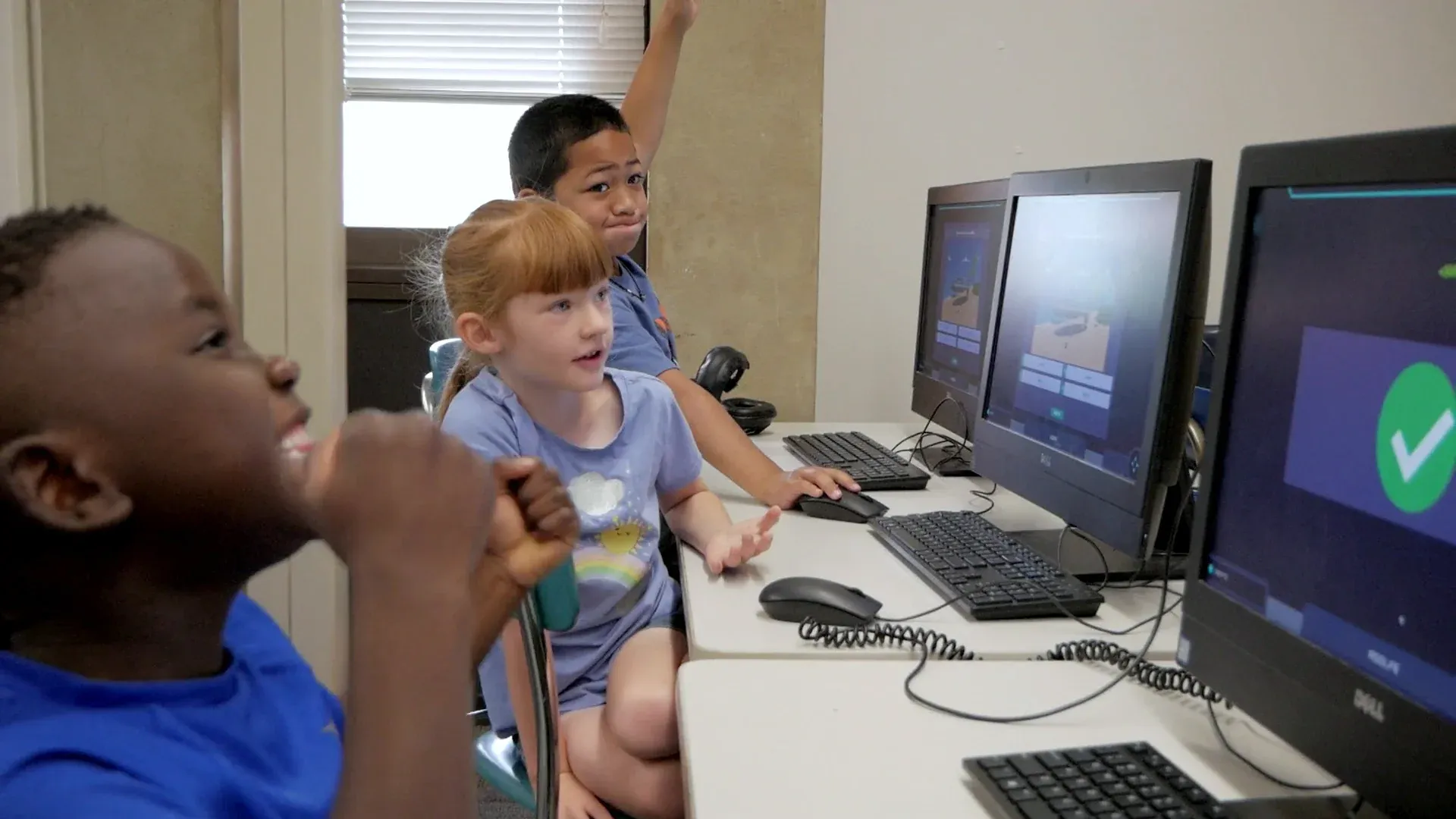
    Three young students at a row of desktop computers: a girl turns to talk, a boy behind her raises his hand, and a big green check fills the nearest screen.
    A green check on the nearest screen, and one hand in the air.

    RALF has tickets to a music festival on Taipan, and his favorite band, Botspace Boys, is playing. Coming out of warp, the Infini-D’s communication system fails: the ship can receive messages but can’t send any back. Rather than turn around, Will and Anja ask the class to find a way to get RALF’s parking ticket number to Taipan’s air control, by creating a light device, so the ship gets clearance to land. The story plays on the projector.

    Every student has their own screen and makes their own calls. You’re at the helm, asking what message needs to go, how light can carry it, and how air control will know what it means.

    The vocabulary is the unit’s: light source, device, messages, communication, signals. It expects children who know what communication is for and a few of the ways it happens. Botspace Boys lists NGSS 1-PS4-4, a science standard. Run the string telephone first, and tell the class why: a message just crossed the hallway on a string, and next they’ll need light to get a number to air control. The lesson prepares them. The Mission is what they’re preparing for.

    “This is the most fun they have all week, and they’re learning the whole time. I’m not going back.”

    Lisa Free, Mission Lab specialist, Cook Elementary School, UT

    Will it work in my room?

    Students join with a class code: no student accounts, no student email, no passwords. Chromebooks, laptops, or tablets, plus your projector. Free for teachers, no credit card. Student data is covered by COPPA and FERPA, and we signed the Student Privacy Pledge. Botspace Boys runs about 18 minutes, which leaves room in a 45-minute block for the debrief.

    START FREE →

    Communication first, then Botspace Boys

    What the report shows

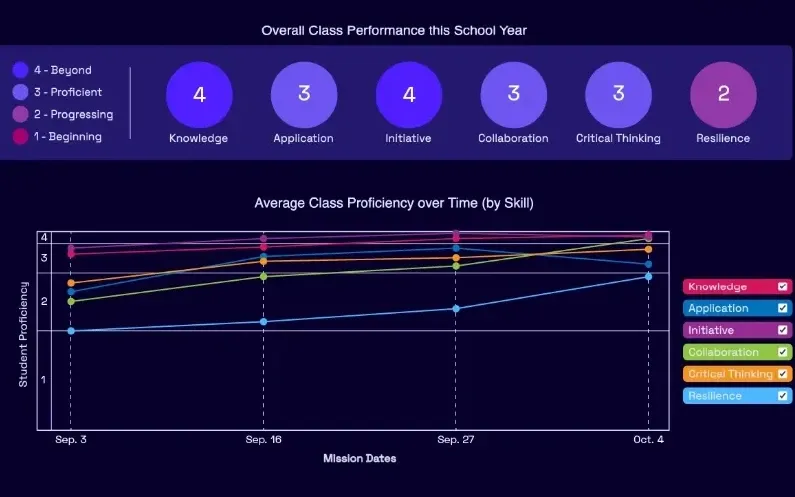
    A Mission.io class report: the class score in each of six skills, from knowledge and application to collaboration, critical thinking, and resilience, with the class chart across the year below.
    A class report from a real Mission: the class score in each of six skills, then each skill across the year.

    Every Mission produces a report for every student, built from what that student did across the whole Mission, on the skills the Mission captured. The six it can capture are Knowledge, Application, Initiative, Collaboration, Critical Thinking, and Resilience. The first two are what a test already sees. The other four are the human skills every school promises. The test shows what they know. The report shows the rest. SEE THE EVIDENCE →

    You taught it. Now find out who can use it.

    Who's behind it

    Mission.io is a research and design organization with one job: make collaborative, active learning something a teacher can run every unit instead of once a semester, and put a report in your hands when it’s over. Over a million students have run a Mission. The research behind them is funded by the National Science Foundation and the U.S. Department of Education’s Institute of Education Sciences, and Mission.io meets ESSA Level II standards, as validated by Instructure.

    Grades K to 2 CSTA standards this page teaches

    Five of the 18 CSTA computer science standards for grades K to 2 are taught here, each by an activity the table names. Click a code to open CSTA’s table of the 2017 standards.

    The five standards this page teaches

    Charts, symbols, loops, precise steps, and debugging.

    The grades K to 2 (level 1A) CSTA standards taught on this page, in CSTA's words, with the activity for each.
    The standardOn this page
    1A-DA-06 Collect and present the same data in various visual formats.On this page: 2. The class pictograph
    1A-AP-09 Model the way programs store and manipulate data by using numbers or other symbols to represent information.On this page: 4. Pixel pictures
    1A-AP-10 Develop programs with sequences and simple loops, to express ideas or address a problem.On this page: 5. Getting Loopy
    1A-AP-11 Decompose (break down) the steps needed to solve a problem into a precise sequence of instructions.On this page: 1. The sandwich robot’s step strip
    1A-AP-14 Debug (identify and fix) errors in an algorithm or program that includes sequences and simple loops.On this page: 1. The sandwich robot

    The science Missions for this grade

    We make no computer science Mission below 4th grade, so both 1st grade Missions are science, one on light and one on sound. None lists a CSTA code.

    Both 1st grade science Missions, each with the code its record lists.
    NumberMissionTopic (code)Minutes
    7Botspace BoysCreate a light device to overcome a communication failure (NGSS 1-PS4-4)18
    8In the CardsUse sound and vibration to help Dug avoid a catastrophe at the Intergalactic Card Stacking Competition (NGSS 1-PS4-1)17
    START FREEMISSION BRIEF →

    Free teacher account, no card. Start with the Communication Mission, marked Start here in your library, then Botspace Boys, each after its 5-minute Teacher Preview.

    Also at this grade

    The 1st grade STEM activities page lists every 1st grade Mission, subject by subject; the 1st grade science activities page has the string telephone to run before Botspace Boys, and rebuilds the rubber band guitar, the sound activity before In the Cards; the 1st grade engineering activities page rebuilds the cup tower; and the kindergarten technology activities page rebuilds the floor-grid robot, the program-before-you-move lesson that comes before this one.

Questions 1st grade technology teachers ask

Which 1st grade computer science standards does this page teach?

Five of the CSTA standards for grades K to 2 (level 1A), each with its activity: 1A-DA-06 charts, 1A-AP-09 symbols for information, 1A-AP-10 loops, 1A-AP-11 precise steps, and 1A-AP-14 debugging. They’re CSTA’s 2017 standards, the codes Code.org’s lessons cite.

What technology skills should a 1st grader have?

First graders here write steps a robot can follow, hunt down the one that broke, use a number code to stand for a picture, write a dance as a loop, and chart one class question more than one way. ISTE’s Standards for Students add seven broader skills: Empowered Learner, Digital Citizen, Knowledge Constructor, Innovative Designer, Computational Thinker, Creative Communicator, and Global Collaborator. For logging in, using a device, and staying safe on it, Common Sense Education and CS Unplugged are free.

Is there a coding Mission for 1st grade?

No. Both Missions that run in 1st grade are science: Botspace Boys, where the class sends a number with a light device, and In the Cards, on sound and vibration. The sandwich robot, pixel pictures, and Getting Loopy carry the programming standards. Our cybersecurity Mission, Cyber Defense Force, starts in 4th grade.

Is the sandwich robot safe for a 1st grade class with food allergies?

Yes, as written here. The bread, the jar, and the banana are paper props cut from the sheet, and the knife is a craft stick, so no food and no allergens come into the room. The story’s friend can’t have jelly, which makes the allergy part of the problem instead of a reason to skip it.

How do I grade debugging in 1st grade?

Grade the fix, not the sandwich. The fix box (“step ___ needed ___”) shows whether a child found the one broken step and changed only that. The four-behavior tally is the other half. A Bug Finder who called out a missing “open the jar” before the freeze is doing exactly what 1A-AP-14 asks.

A sandwich a friend would actually eat

Day one, the sandwich robot with the sheet. When the science unit turns to light and sound, the 1st grade science page's string telephone, then Botspace Boys after its 5-minute Teacher Preview. All free.