Kindergarten technology activities

The floor-grid robot rebuilt so kindergartners lay the whole program down before anyone moves, five more activities by standard, a free sheet, and the CSTA standards each one teaches.

Who we are. Mission.io makes Missions: teacher-led, whole-class simulations where students use what they’re learning to work through a real scenario together.

Everything on this page works without us. The standards each one teaches are at the end, with the two Missions that run in kindergarten. (In Forecast Fiasco, Moodoo has tampered with Tellenor’s weather forecasting system, so the crew has to work out the real weather from real-time footage and maps.)

On this page

What kindergarten technology looks like

Kindergarten technology activities are computer science you can walk on: the class writes a program out of arrow cards, a classmate follows it square by square, and somebody has to catch the wrong turn before the robot takes it. This page teaches five of the CSTA computer science standards for grades K to 2 (level 1A).

For a lot of kindergarten teachers, technology means the first weeks at a device: holding a tablet, using a mouse, finding the right app, and learning what to keep private. This page covers the computer science half. For the device and safety half, Common Sense Education’s digital citizenship lessons and CS Unplugged are free, and the ISTE Standards for Students (Digital Citizen, Computational Thinker, and five more) name the skills.

Kindergarten opens the K to 2 band. The activities here teach naming a device’s parts (1A-CS-02), creating and following step-by-step instructions (1A-AP-08), building programs with sequences and simple loops (1A-AP-10), breaking a task into precise steps (1A-AP-11), and finding and fixing errors (1A-AP-14). Over the three years, the band also covers using symbols to stand for information, planning a program, passwords, data in charts, and working safely online. These are the 2017 CSTA codes, which Code.org’s lessons also cite; CSTA published a new PK-12 revision in 2026.

The usual version goes like this: one child lays the arrows, one child walks, the rest of the rug watches, and the robot reaches a paper star for no reason anyone can name. Programming shows up the moment every card is down before anybody moves, and one child’s whole job is to read the row first and say “fix.”

Six things a kindergarten robot game needs

CSTA’s computer science standards name seven core practices, and two of them are about the people in the room: collaborating around computing, and fostering an inclusive computing culture. They sit on the same list as testing and refining what you make (CSTA, 2017). At five, collaborating means a group of three where the program can’t run unless all three do their job.

  1. 1. A real problem with stakes the class can feel.

    “Get to the star” is a path. “Get the lunch to a hungry friend without stepping in the wet paint” is a problem.

  2. 2. Apply, don't recall.

    A longer second delivery, where the same cards repeat and one repeat card can stand in for them. It only works if round one’s rule stuck: the robot does what the cards say, in order.

  3. 3. Group goals with individual accountability.

    The one most floor robots miss: one child programs, one walks, and the rest sit. When the group shared a goal and each student answered for a part, 84% of studies found a positive effect; without both, 17% (Slavin, 1991).

  4. 4. The teacher leads the thinking.

    Three questions, kneeling at the card strip (which card comes first, where will the robot be after this one, what’s missing if the lunch lands in the paint) do more than a page of arrows at the table.

  5. 5. A debrief where the class argues it out.

    The walk takes a minute. The talk on the rug afterward, about which strip got there in the fewest cards and which card sent a robot into the paint, is finding and fixing an error out loud (1A-AP-14).

  6. 6. A way to see who did what.

    On a floor grid, every five-year-old looks busy. The tally shows who laid a correct sequence, who walked it without helping, and who caught the bad turn.

Lay every card down. Then the robot moves.

The sheet at the end of the next section has the role cards, the arrow cards, and the paper grid the Checker traces with a finger. Get the sheet →

The floor robot, rebuilt for kindergarten (1A-AP-08)

A taped grid on the floor, a child as the robot, and arrow cards (forward, turn left, turn right) laid out as a program to get from start to a goal square. Creative Kindergarten and Canada Learning Code both build their unplugged lessons on it, it’s the paper version of the Bee-Bot in most kindergarten STEM carts, and Code.org’s Happy Maps is the same idea on paper. Teachers run it during Hour of Code week because it needs tape and index cards. The usual run has one programmer, one walker, and a star nobody has a reason to reach. Here it is with the same tape and cards and all six in.

Time
35 to 40 minutes, which is how long it really runs.
Groups
Threes. With 22 children, seven groups of three and one class Paint Inspector, who checks every grid before a run.
Supplies
Masking tape for three or four 4 by 4 floor grids (groups take turns), about 15 arrow index cards and a paper bag per group, and the paper grid on the sheet. About $3.
Standards
1A-AP-08 (create and follow step-by-step instructions), with 1A-AP-10 (sequences and a simple loop) when the repeat card arrives in round two, and 1A-AP-14 (find and fix errors) all the way through. ISTE 1.5.d is the ISTE cousin.
  1. Teach first, 8 minutesApply

    Be the robot yourself. Ask the class how to get you from the door to your chair, and do exactly what they say, including walking into the wall when they forget a turn. Name the three cards: forward one square, turn left, turn right. Name the rule: the robot only does what the cards say, in order.

  2. The problemStakes

    The robot has to deliver a lunch (a paper bag) to a friend’s square on the grid without stepping on the wet paint (two taped X’s). A wrong program puts the lunch in the paint, and the friend goes hungry. The team lays the whole program before the robot moves, and nobody can help the robot once it starts.

  3. Three roles, one job eachAccountability

    On the cards, with names on them. Rotate every round so everyone programs.

    • Programmer

      The only hands on the arrow cards. Lays them in a row on the card strip.

    • Robot

      Walks the cards exactly, one card per step, says each card aloud, and stops if a card would land in the paint.

    • Checker

      Traces the program on the paper grid with a finger before the Robot moves, then says "go" or "fix."

  4. You lead the thinkingTeacher leads

    Three questions, kneeling at the card strip: Which card comes first, and why? Where will the robot be after this card? What card is missing if the robot ends up in the paint? Keep your hands off the strip. The Checker’s finger does the pointing.

  5. Two rounds, and a repeat cardApply

    Round one: a 4-step delivery. Round two: a longer delivery where the same three cards repeat, and the team gets a “repeat 2 times” card to put in their place (1A-AP-10). Rotate roles between rounds.

  6. The debrief, 8 minutesDebrief

    On the rug, two card strips under the camera. Which program got the lunch there with the fewest cards? Where did a robot step in the paint, and which card was wrong? Who in your group stopped a bad turn before the robot moved? Finish with that Checker and the card they caught.

  7. See who did whatSee who did what

    The observation sheet, four behaviors per child: laid a correct sequence, walked a program exactly with no helping, found a bug before or after a run, used the repeat card correctly. With five-year-olds, a tally catches about a third of the room; the Checker’s “go” or “fix” is out loud and easy to mark.

(If a lunch lands in the wet paint in round one, leave the bag where it landed until the debrief. It’s the evidence.)

Leave one grid taped down for the week, with the arrow cards in a basket beside it.

The floor-grid robot, free

Emailed now, ready to copy: the teacher page, three role cards, the arrow cards (Forward, Turn left, Turn right), the repeat cards, the paper grid, the tape plan for the floor grid with an answer key, and the four-behavior tally.

It’s on its way.

Check your inbox for the floor-grid robot.

Email me the sheet. It comes as a PDF, ready to print. Unsubscribe anytime.

Five more for kindergarten, by standard

Five more that turn up on every kindergarten list: what each one is, how it usually runs, and what it needs to be computer science, in the order the standards run.

Devices, instructions, loops, debugging

2. The device parts sort (1A-CS-02)

Needs a tablet or laptop, and a class chart. Whole class.

The class names the parts of a tablet or laptop, like the screen, the camera, the speaker, and the charging port, and what each one does, while you write them on a chart. You lead it, and kindergartners love finding the tiny camera. As usually run, though, there’s no problem behind the chart and nobody owns a part, so it ends when the chart is full and you can’t tell which child could name what.

The fix

  1. Give the chart a reason: a tablet is back from the repair shop, and the class has to check that every part is there before it goes back to work.
  2. Hand each child one part card, and only that child points to the part and says what it does.
  3. Finish on the rug with one question (which part would you miss most if it broke?), and tick a class list as each child names a part.

No page for this one; the four misses are the work left.
3. Happy Maps (1A-AP-08)

Needs Code.org's paper maps, a pencil. Usually individual.

Happy Maps, from Code.org’s Course A, puts a character on a paper grid, and students draw a row of arrows that walks it to its goal. Every arrow has to be right, so the program really gets used. As usually run, though, each child works alone on a worksheet, the goal is just a picture to reach, and a finished page looks the same whoever made it.

The fix

  1. Give the character a reason to get there, like the floor robot’s lunch for a hungry friend, with a square of wet paint to steer around.
  2. Work in pairs: one child draws the arrows, and the other traces them with a finger and says “go” or “fix” before the next arrow goes down.
  3. Swap jobs on the next map, and tick who drew a correct row and who caught a wrong arrow.

No page for this one; it’s the floor robot shrunk to a desk.

4. Bee-Bot on a mat (1A-AP-10)

Needs a Bee-Bot and a grid mat. A station.

Bee-Bot is the bee-shaped robot in most kindergarten STEM carts: children press its arrow buttons to store a program, press GO, and watch it roll across a grid mat. It does exactly what was pressed, so a wrong turn shows up right away. As usually run, though, it’s a station where whoever holds the robot presses every button, and nobody talks about the wrong turns afterward.

The fix

  1. Bring the floor robot’s three roles to the mat: a Programmer who lays arrow cards, a Checker who traces them on the mat with a finger, and a Robot who presses only the buttons the cards show.
  2. Rotate the roles after every run, so every child programs once.
  3. Bring two card strips to the rug at the end, ask which card sent a Bee-Bot off course, and mark who caught it.

The role cards on the sheet work at the mat.

5. Program a friend to draw a shape (1A-AP-11)

Needs paper, a crayon, a shape card. Pairs.

One child looks at a shape card and gives the steps out loud (draw a line down, now a line across), and the partner draws exactly what they hear. The steps get used, and a lopsided shape shows right away which step was unclear. As usually run, though, it turns into a giggle, the crayon goes back and forth, and nothing shows who gave a clear step.

The fix

  1. Name the jobs: a Speaker who holds the shape card face down to the partner, and a Drawer who holds the only crayon.
  2. The Speaker gives one step at a time, and the Drawer draws only that step.
  3. Lay the drawing next to the card, then swap jobs and use a new shape.

No page for this one; the Speaker and the Drawer are the fix.

6. The sandwich robot (1A-AP-14)

Needs paper props, and you as the robot. Whole class.

The class gives the steps for making a sandwich, and the robot follows each one literally, so “put the peanut butter on the bread” leaves the jar sitting on the loaf. Kindergartners see right away that a robot does only what the step says. In kindergarten it works best as a demo, with you as the robot. As usually run, though, the robot’s mistakes are the whole joke, and nobody finds the step that caused them.

The fix

  1. Do exactly what each step says, and freeze the moment a step can’t be done.
  2. At each freeze, ask the rug which step was the bug and what one word would fix it.
  3. Change only that step, and run the sandwich again.

See the sandwich robot on the 1st grade page →

  • Our part · We make Missions

    When the science unit comes around

    Plenty of teachers rebuild these by hand every unit, and it works. A Mission is a teacher-led, whole-class simulation built from a unit you teach. We have no computer science, cybersecurity, or digital citizenship Mission below 4th grade, so the two that run in kindergarten are science. When the science unit turns to weather, run the weather chart on the kindergarten science page, and after a month of the weather chart, Forecast Fiasco.

    You're at the helm, not on the hook.

    Forecast Fiasco: weather forecasts, as a Mission

    Forecast Fiasco · Grades K to 2 · About 22 minutes · One device per student, plus your projector · Free with a teacher account

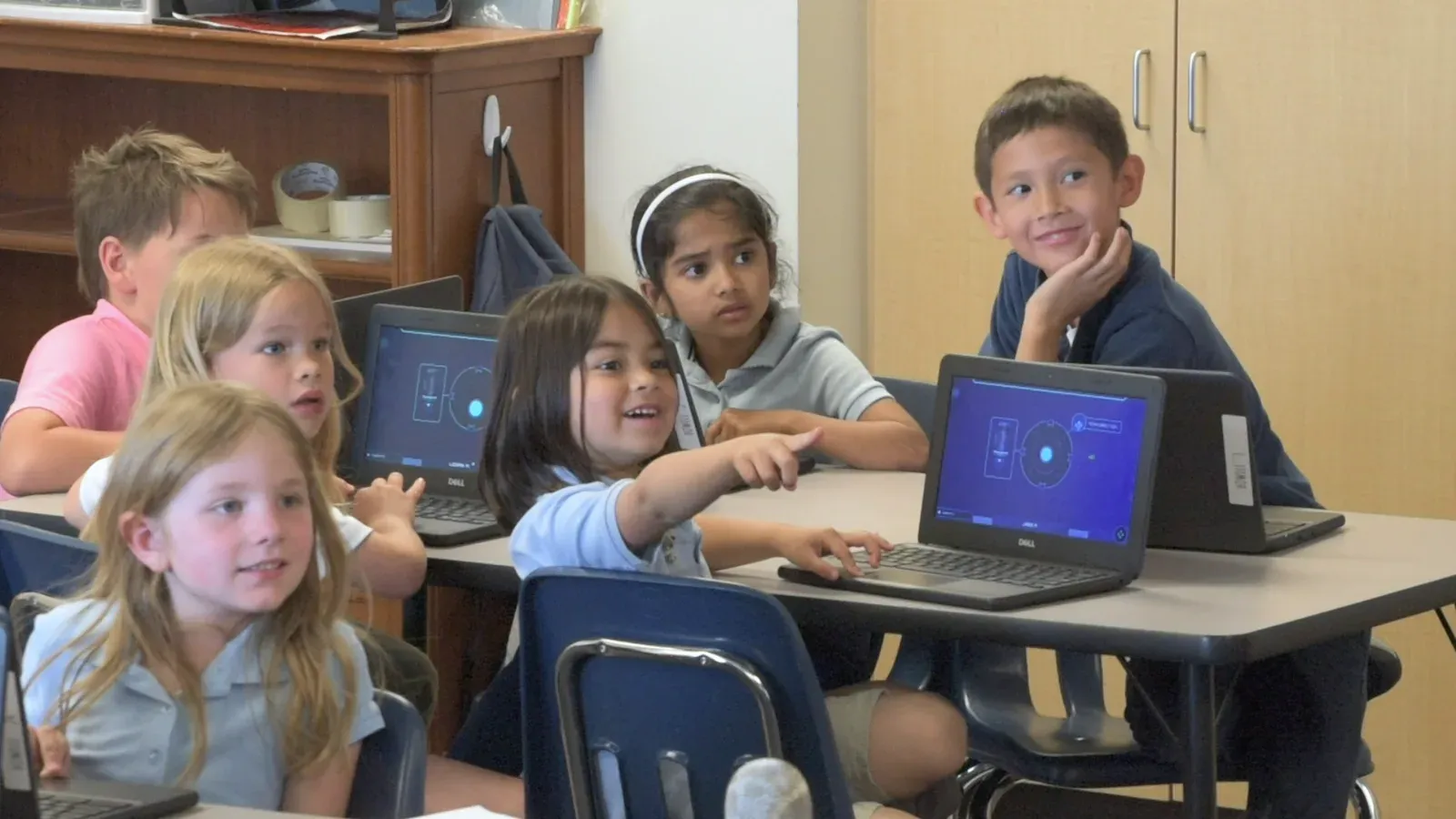
    Young students at a table of Chromebooks; one girl points at a classmate's screen while a boy beside her rests his chin on his hand and smiles.
    Young students at their Chromebooks, one pointing at a classmate's screen.

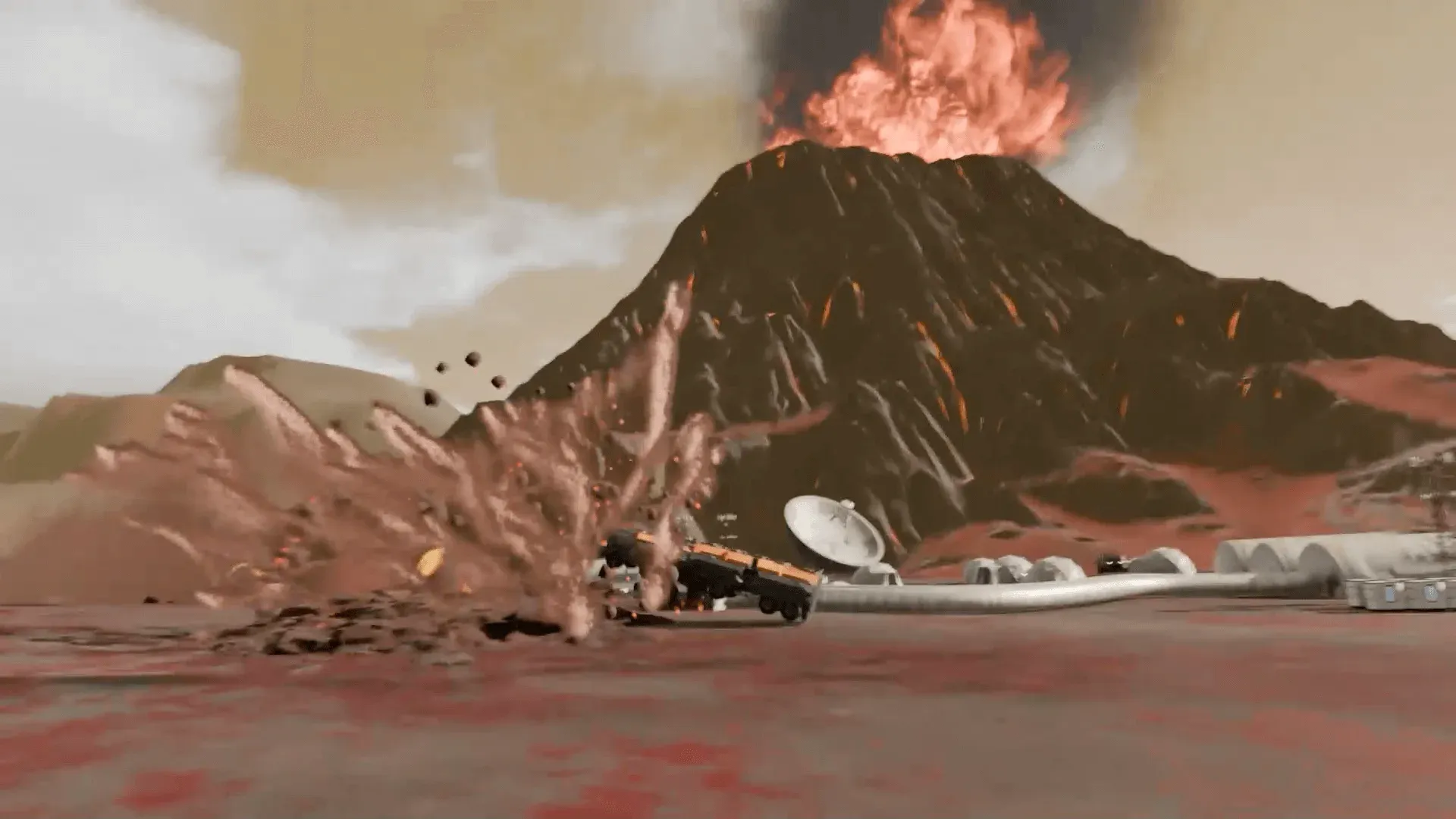
    Moodoo has tampered with Tellenor’s weather forecasting system, and nobody there knows what’s really coming. The class has to work out what the weather actually is from real-time footage and maps, then decide the best way for Tellenor to prepare for it and respond. The story plays on the projector.

    Every student has their own screen and makes their own calls. You’re at the helm, asking what the footage shows, what the map shows, and what the people should do now.

    The vocabulary is the unit’s: weather forecast, severe weather, extreme heat, high winds, flash floods, thunderstorms, snowstorms, prepare, respond. It expects children who know what a forecast is for, a few kinds of weather, and how people get ready for a storm. Forecast Fiasco lists NGSS K-ESS3-2, a science standard. Run a month of the weather chart first, with its prediction before anyone looks out the window, and tell the class why: someone has tampered with Tellenor’s forecasts, and they’ll have to check them against real footage and maps. The lesson prepares them. The Mission is what they’re preparing for.

    “Unprompted, the students all began to applaud like you see in the videos of NASA control rooms. It made my day.”

    Charity Perry, Kindergarten teacher, Pony Express Elementary, UT

    Will it work in my room?

    Students join with a class code: no student accounts, no student email, no passwords. Chromebooks, laptops, or tablets, plus your projector. Free for teachers, no credit card. Student data is covered by COPPA and FERPA, and we signed the Student Privacy Pledge. Forecast Fiasco runs about 22 minutes, so a 45-minute block still has room for the debrief.

    START FREE →

    Communication first, then Forecast Fiasco

    What the report shows

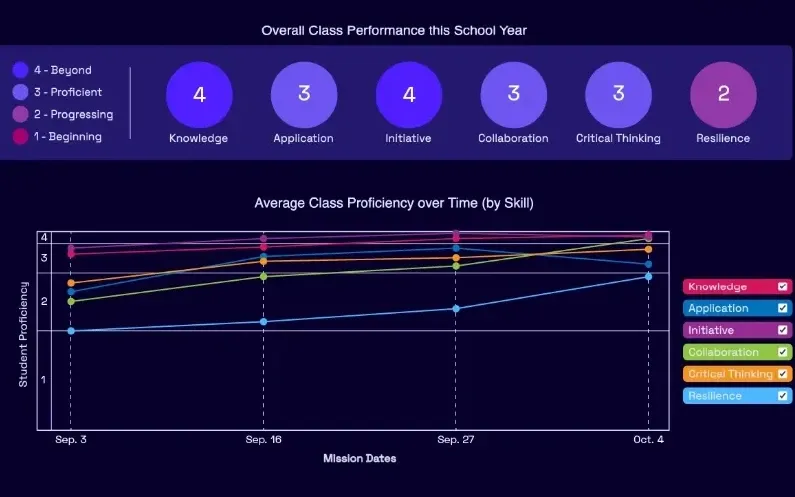
    A Mission.io class report: the class score in each of six skills, from knowledge and application to collaboration, critical thinking, and resilience, with the class chart across the year below.
    A class report from a real Mission: the class score in each of six skills, then each skill across the year.

    Every Mission produces a report for every student, built from what that student did across the whole Mission, on the skills the Mission captured. The six it can capture are Knowledge, Application, Initiative, Collaboration, Critical Thinking, and Resilience. The first two are what a test already sees. The other four are the human skills every school promises. The test shows what they know. The report shows the rest. SEE THE EVIDENCE →

    You taught it. Now find out who can use it.

    Who's behind it

    Mission.io is a research and design organization with one job: make collaborative, active learning something a teacher can run every unit instead of once a semester, and put a report in your hands when it’s over. Over a million students have run a Mission. The research behind them is funded by the National Science Foundation and the U.S. Department of Education’s Institute of Education Sciences, and Mission.io meets ESSA Level II standards, as validated by Instructure.

    Grades K to 2 CSTA standards this page teaches

    The activities on this page teach five of the 18 CSTA computer science standards for grades K to 2, and the table names the activity for each. Every code links to CSTA’s table of the 2017 standards.

    The five standards this page teaches

    A device’s parts, step-by-step instructions, loops, precise steps, and debugging.

    The grades K to 2 (level 1A) CSTA standards this page teaches, in CSTA's words, with the activity for each.
    The standardOn this page
    1A-CS-02 Use appropriate terminology in identifying and describing the function of common physical components of computing systems (hardware).On this page: 2. The device parts sort
    1A-AP-08 Model daily processes by creating and following algorithms (sets of step-by-step instructions) to complete tasks.On this page: 1. The floor robot and 3. Happy Maps
    1A-AP-10 Develop programs with sequences and simple loops, to express ideas or address a problem.On this page: 1. The floor robot, round two and 4. Bee-Bot
    1A-AP-11 Decompose (break down) the steps needed to solve a problem into a precise sequence of instructions.On this page: 5. Program a friend
    1A-AP-14 Debug (identify and fix) errors in an algorithm or program that includes sequences and simple loops.On this page: 1. The floor robot’s Checker

    The science Missions for this grade

    We have no computer science Mission below 4th grade, so the two that run in kindergarten are science, one on weather forecasts and one on daylight. None lists a CSTA code.

    The two science Missions that run in kindergarten, with the codes their records list.
    NumberMissionTopic (code)Minutes
    7Forecast FiascoOutsmart Moodoo to help Tellenor react correctly to severe weather (NGSS K-ESS3-2)22
    8Dug's Beach PartyHelp Dug track patterns of daylight for his beach spot (NGSS 1-ESS1-1)21
    START FREEMISSION BRIEF →

    Free teacher account, no card. Start with the Communication Mission, marked Start here in your library, then Forecast Fiasco, each after its 5-minute Teacher Preview.

    Also at this grade

    The kindergarten STEM activities page lists every kindergarten Mission, subject by subject; the kindergarten engineering activities page rebuilds the shade structure, and the kindergarten math activities page rebuilds counting collections; and the 1st grade technology activities page turns the sandwich robot into a debugging lesson.

Questions kindergarten technology teachers ask

Which kindergarten computer science standards does this page teach?

Five of the CSTA standards for grades K to 2 (level 1A), each with its activity: 1A-CS-02 a device’s parts, 1A-AP-08 step-by-step instructions, 1A-AP-10 sequences and a simple loop, 1A-AP-11 precise steps, and 1A-AP-14 finding and fixing errors. They’re CSTA’s 2017 standards, the codes Code.org’s lessons cite.

What technology skills should a kindergartner have?

At five, the computer science on this page is arrows on the floor: following and laying steps in order, swapping repeated steps for a loop card, breaking a job into exact moves, fixing a wrong turn, and naming a device’s parts. Past computer science, the ISTE Standards for Students name seven skills: Empowered Learner, Digital Citizen, Knowledge Constructor, Innovative Designer, Computational Thinker, Creative Communicator, and Global Collaborator. For using a device and staying safe on it, Common Sense Education and CS Unplugged are free.

Is there a coding Mission for kindergarten?

No. Both Missions that run in kindergarten are science: Forecast Fiasco, on weather forecasts, and Dug’s Beach Party, on daylight. The floor robot, Happy Maps, and Bee-Bot carry the programming standards. Our cybersecurity Mission, Cyber Defense Force, starts in 4th grade.

Can kindergartners program before they can read?

Yes. A program here is a row of just three kinds of cards (forward one square, turn left, turn right) laid on a strip, and you teach all three by acting them out before anyone lays one. Read each role card aloud as you hand it out. The Robot says each card aloud as it walks, so the whole group hears the program run. Steps become sentences in 1st grade, with the sandwich robot.

How do I run a floor grid with 22 kindergartners?

Tape three or four 4 by 4 grids and let groups take turns. Make seven groups of three, and give the 22nd child the class Paint Inspector job, checking every grid before a run. Plan on 35 to 40 minutes. The tally will catch about a third of the room, and the Checker’s “go” or “fix” is the easiest moment to mark.

Get the lunch past the wet paint

Day one, the floor robot with the sheet. When the science unit turns to weather, the kindergarten science page's weather chart, and after a month of the weather chart, Forecast Fiasco, once you've watched its 5-minute Teacher Preview. All free.