5th grade technology activities

Cup-stacking robots rebuilt so 5th graders break a problem into pieces before they program, five more activities by standard, a free sheet, and the CSTA standards each teaches.

Who we are. Mission.io makes Missions: teacher-led, whole-class simulations where students use what they’re learning to work through a real scenario together.

Everything on this page works without us. The standards each one teaches are at the end, and so is our one cybersecurity Mission, Cyber Defense Force. (A firewall update leaves a planet open to hackers, and the only thing in the way is a class that can spot a fake email.)

On this page

What 5th grade technology looks like

Fifth grade technology activities are computer science problems where the class has to plan, test, and fix something that runs, argue about which version is better, and leave each student answerable for a piece. This page teaches six of the CSTA computer science standards for grades 3 to 5 (level 1B), plus online safety.

A lot of searches for technology activities mean the computer lab: typing, searching safely, digital citizenship. This page covers the computer science half and online safety. For the rest, Common Sense Education’s digital citizenship lessons and CS Unplugged are free, and the ISTE Standards for Students (Digital Citizen, Computational Thinker, and five more) name the skills.

Fifth grade is the last year of the band. By the end of it, students break problems into smaller parts (1B-AP-11), compare and refine algorithms (1B-AP-08), test and debug (1B-AP-15), take on team roles while they build (1B-AP-16), and model how information travels in packets (1B-NI-04). The rest of the band covers how devices work, data, cybersecurity and personal information, and how computing changes the world. The codes are CSTA’s 2017 standards, the ones Code.org’s lessons cite. CSTA released new PK-12 standards in 2026.

Picture the usual version: one kid plays the robot, a pile of kids shout instructions, and the cups end up as a tower nobody planned. Everyone had fun, and nobody wrote a program. Programming starts when the plan is on paper and the robot does exactly what it says.

Six things that turn a coding game into CS

The standards already count the room as part of the work. Of the seven core practices in the CSTA computer science standards, one is collaborating around computing and another is fostering an inclusive computing culture, next to testing and refining what you build (CSTA, 2017). A program five kids argued over and one kid ran is closer to the real thing than a tutorial finished alone. The trick is making every one of the five answerable.

  1. 1. A real problem with stakes the class can feel.

    “Stack the cups in a pyramid” is a shape. “Every instruction costs the company a dollar” is a problem.

  2. 2. Apply, don't recall.

    A second round that only works with what the first one showed. If the program can be finished without testing it, it isn’t computer science.

  3. 3. Group goals with individual accountability.

    The one most coding games miss: one robot, four programmers talking at once. When the group shared a goal and each student answered for a part, 84% of studies found a positive effect; without both, 17% (Slavin, 1991).

  4. 4. The teacher leads the thinking.

    Three questions at the cups (what subproblem is this line solving, where did the robot freeze, can two symbols become one) beat a worksheet of twenty at the desk.

  5. 5. A debrief where the class argues it out.

    The run is the setup. The argument afterward, about which program is better and why, is what the standard names: compare and refine algorithms (1B-AP-08).

  6. 6. A way to see who did what.

    If you can’t tell who found the bug and who just watched the robot, you can’t teach debugging. You can only grade the stack.

A robot never guesses. Neither can the plan.

The sheet at the end of the next section has the symbol card, the two displays, the program strips, and the tally, ready to copy. Get the sheet →

Cup-stacking robots, rebuilt for 5th grade (1B-AP-11)

A team writes a program in six symbols (pick up, put down, step forward, step back, turn left, turn right) to stack cups into a target shape, and a teammate plays the robot and runs it exactly. It’s Code.org’s “My Robotic Friends”, which opens its 5th grade course, and Code.org publishes its Course E version aligned to 1B-AP-11. The way it usually runs is one robot, programmers in a pile, and a stack that’s a shape with nothing riding on it. Here’s the version that hits all six.

Time
50 minutes. The 45-minute cut: one display instead of two, and a shorter round two (compare the programs only, and skip the repeat-card shortening).
Groups
Fours. With 29 students, seven groups of four and one group of five with a second Auditor.
Supplies
10 plastic cups per team (a sleeve of 100 is about $6), with the symbol cards and program strips on the sheet. About $6.
Standards
1B-AP-11 (decompose a problem into smaller subproblems), with 1B-AP-08 (compare and refine algorithms) in round two and 1B-AP-15 (test and debug) all the way through. ISTE 1.5.d is the ISTE cousin.
  1. Teach first, 10 minutesApply

    Show the six symbols, then be the robot for a two-cup program the class writes. Run it literally, including setting a cup down on top of another when the program forgets a step forward. Name the rules: the robot starts with its hand at the stack, “pick up” lifts one cup, “step” moves half a cup-width, and a program is finished only when the hand is back at the stack. Then name decomposition: a six-cup pyramid is three on the bottom, two in the middle, one on top, so write the bottom row first.

  2. The problemStakes

    A warehouse robot has to build a display (the target stack on the sheet), and every instruction costs the company one dollar. The company will pick the team whose program builds the display right with the fewest instructions. Criteria: the display matches the picture exactly, and the robot never has to improvise. Constraints: the six symbols only, and nobody touches or talks to the robot once it starts. Say the stakes out loud: every extra symbol is money, and a wrong display is a lost sale.

  3. Four roles, one job eachAccountability

    On the sheet, and everyone signs their role’s box.

    • Decomposer

      Splits the display into rows and sub-stacks on the plan before any symbol is written. The only pencil on the plan.

    • Programmer

      The only pencil on the symbol strip, writing from the Decomposer's plan.

    • Robot

      Runs the strip exactly, one symbol per move, says each one aloud, and freezes on an impossible instruction.

    • Auditor

      Counts the instructions, checks the result against the picture, and logs where the robot froze.

  4. You lead the thinkingTeacher leads

    Three questions, asked at the cups: What subproblem is this part of the program solving? Where did the robot freeze, and which symbol is the bug? Can two symbols here become one with a repeat? The hardest part is not reaching for the cups yourself. Let the strip be wrong.

  5. Two rounds, so the first program has to be readApply

    Round one: plan, program, and run the display. Round two: the team gets another team’s program for the same display, runs it with its own Robot, and the Auditor compares the instruction counts and whether each one worked. Then the team shortens its own program with a repeat card. Round two only works if somebody can read a program they didn’t write.

  6. The debrief, 10 minutesDebrief

    Two programs on the board. Which one built the display with the fewest instructions, and what did it do differently? Where did most robots freeze, and which subproblem did the planners skip? Who in your group caught a bug by reading the strip, not by watching the robot? Fifth graders will name the Auditor who counted 23 against 31.

  7. See who did whatSee who did what

    The observation sheet, four behaviors per student: broke the display into parts on paper, wrote or read a symbol correctly, found a bug and named the symbol, compared two programs with a reason. The robot runs are slow and public, so tally during planning; you’ll catch about half the room in one period.

(If a robot freezes and looks at you for help, look at the Auditor instead. That freeze is the bug report, and logging it is the Auditor’s job.)

Keep the strips. Next unit, hand a team its old program and ask them to shorten it.

The cup-stacking robots, free

Emailed now, ready to copy: the teacher page, four role cards, the six-symbol card with the repeat, the two displays, the 40-box program strip, the decomposition box with the audit line, an answer key, and the four-behavior tally.

It’s on its way.

Check your inbox for the cup-stacking robots.

Email me the sheet. It comes as a PDF, ready to print. Unsubscribe anytime.

Five more 5th grade technology activities, by standard

Five more on every 5th grade list: what each one is, how it usually runs, and what it needs to be computer science, in the order the standards run.

Networks, programming, information

2. The packet relay (1B-NI-04)

Needs a message cut into numbered pieces, a room to carry them across. Teams.

A message gets cut into numbered pieces, “routers” carry them across the room, and a team at the other end puts it back together. It’s a real model of how a message crosses the internet in packets. As usually run, though, it’s a relay race where the fastest runners carry most of the packets, and nobody notices which piece arrived late.

The fix

  1. Give each team four jobs: a Sender who cuts and numbers the message, two Routers who carry the packets, and a Receiver who rebuilds it.
  2. Have the Receiver log each packet’s number as it arrives.
  3. Compare the logs at the end, and find the packet that arrived out of order on each team.

No page for this one; the four roles and the log are the fix.
3. Conditionals with cards (1B-AP-10)

Needs a deck of playing cards. Small groups.

Students write if-then rules and play them out with a deck of playing cards: if the card is a face card, then draw again, else pass. 5th graders have usually met it, so it’s a quick review before the cup robots. As usually run, though, the rules stay loose, and nobody checks whether every card has exactly one.

The fix

  1. Have each group write its rules in if-then-else form on one card.
  2. Before playing, a Tracer walks ten cards through the rules on paper and marks any card with no rule, or with two.
  3. Then move to the cup robots, where every symbol has to be just as exact.

See conditionals with cards on the 4th grade page →

4. A Scratch animation or game (1B-AP-10)

Needs a device per pair, a free [Scratch](https://scratch.mit.edu/) account. Pairs.

Students build an animation or a simple game in Scratch, from a dancing cat to a sprite that catches falling apples. The programming is real, with loops, events, and if-then checks. As usually run, though, each student builds alone, nobody explains their code to anyone, and you can’t tell who solved the hard part.

The fix

  1. Pair students, and have them storyboard the project on paper first, one box per scene or event, before anyone touches the screen.
  2. Swap the keyboard at set times, so each partner programs part of the plan.
  3. Have each partner initial the boxes they built.

No page for this one; the paper storyboard and the keyboard swap are the fix.

5. "Is it a reliable source?" (ISTE 1.3.b)

Needs three web pages to rate. Individual, usually.

Students look at three web pages on the same topic and rate whether each one can be trusted, from who made it to when and why. The thinking is real, and you lead it. As usually run, though, it’s a worksheet each, and a finished rating can’t show who reasoned it out and who guessed.

The fix

  1. Run it right before Cyber Defense Force, where the class judges messages instead of pages.
  2. Pair students, and have each partner rate the pages alone first, then agree on one rating with a reason for each page.
  3. Collect the ratings with both names and both reasons on them.

No page for this one; the two misses are the fix.

6. Hour of Code tutorials

Needs a device per student, one hour.

Students spend one hour on an online tutorial from Hour of Code, solving puzzles by dragging blocks, often with characters they know from games and movies. The programming is real, and it’s good practice. As usually run, though, each student clicks through alone, and it isn’t a lesson until somebody has to explain their code to somebody else.

The fix

  1. Treat the hour as practice, and keep your computer science lessons on the calendar around it.
  2. Stop the room twice during the hour, and have each student explain one solved puzzle to a neighbor, block by block.

No page for this one; the four misses are the fix.

  • Our part · We make Missions

    Then the unit has somewhere to go

    Plenty of teachers rebuild these by hand every unit, and it works. A Mission is a teacher-led, whole-class simulation built from a unit you teach. No Mission teaches programming at this grade. When the unit turns to online safety, run the reliable-source check, then Cyber Defense Force.

    You're at the helm, not on the hook.

    Cyber Defense Force: cybersecurity, as a Mission

    Cyber Defense Force · Grades 4 to 12 · About 37 minutes · One device per student, plus your projector · Free with a teacher account

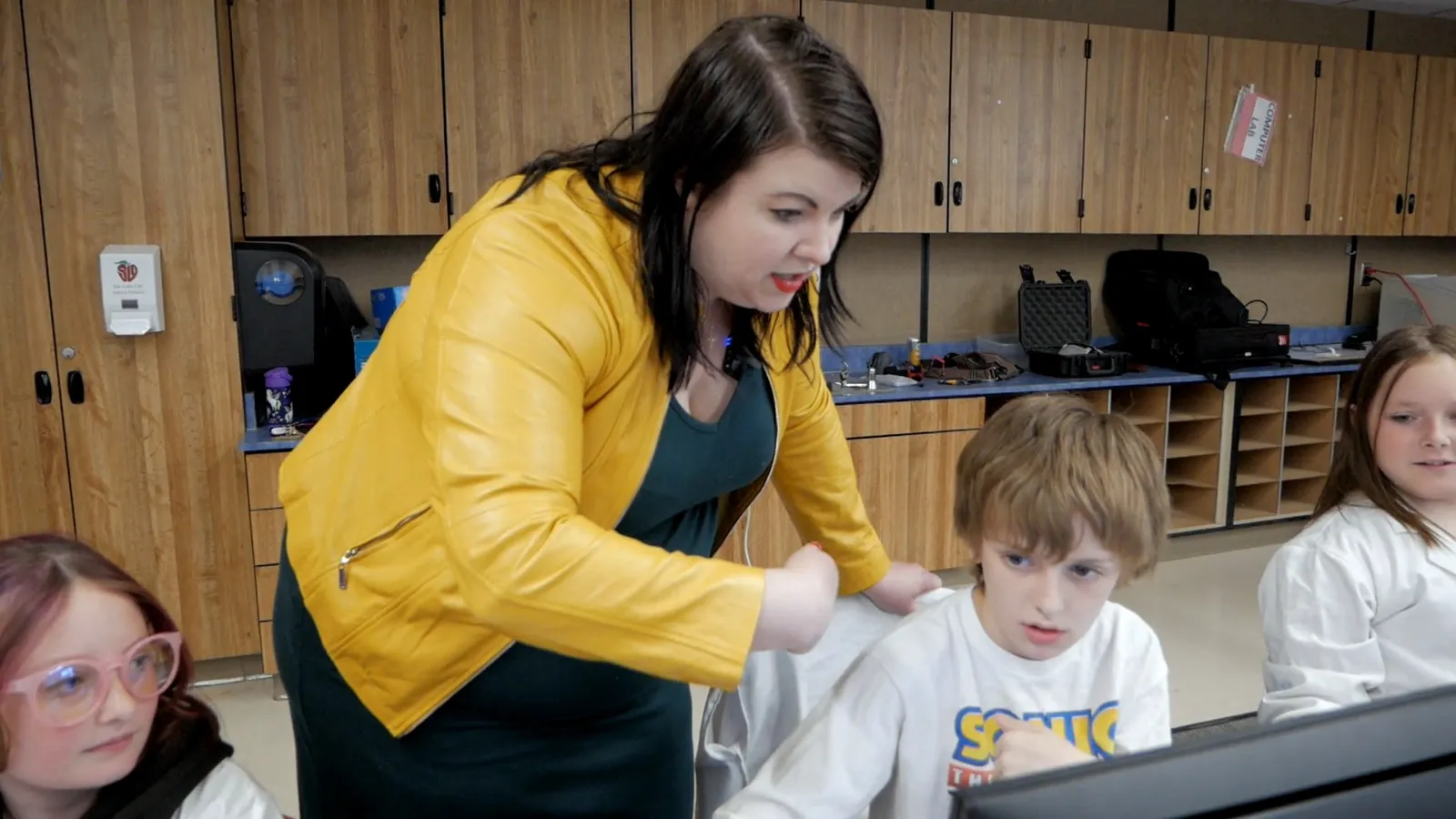
    A teacher in a yellow jacket leans over a student at a computer station while two classmates in lab coats look on.
    A teacher leaning in to one student's station, mid-Mission.

    A planetary firewall update leaves the defense system open to hackers for a while. To get ready, the crew takes a crash course in phishing: fraudulent emails, suspicious links, and fake websites. Then the messages start coming in, and the crew has to decide which are safe and which are threats, using the S.T.O.P. method. The story plays on the projector. The work happens at seven stations (Command, Engineering, Medical, Security, Science, I.T., Operations) and in the arguments between them.

    Every student is assigned to a team, and each team’s work is themed to it, from its own information and challenge to the same problem the rest of the crew is solving. The team gives a student a role in the story and people to lean on while you move between teams. You’re at the helm, asking what made that message suspicious.

    The vocabulary is the unit’s: phishing, hacker, firewall, personal information, scam. Run the reliable-source check first, and tell the class why: the planet is about to ask them the same question about messages. The lesson prepares them. The Mission is what they’re preparing for.

    “Observe a mission in another classroom. It will change the way you think about them.”

    Danica Puente, Teacher, Holbrook Elementary, UT

    Will it work in my room?

    Students join with a class code: no student accounts, no student email, no passwords. Chromebooks, laptops, or tablets, plus your projector. Free for teachers, no credit card. Student data is covered by COPPA and FERPA, and we signed the Student Privacy Pledge. At about 37 minutes, Cyber Defense Force fits a 45-minute period with time left for the debrief.

    START FREE →

    Communication first, then Cyber Defense Force

    What the report shows

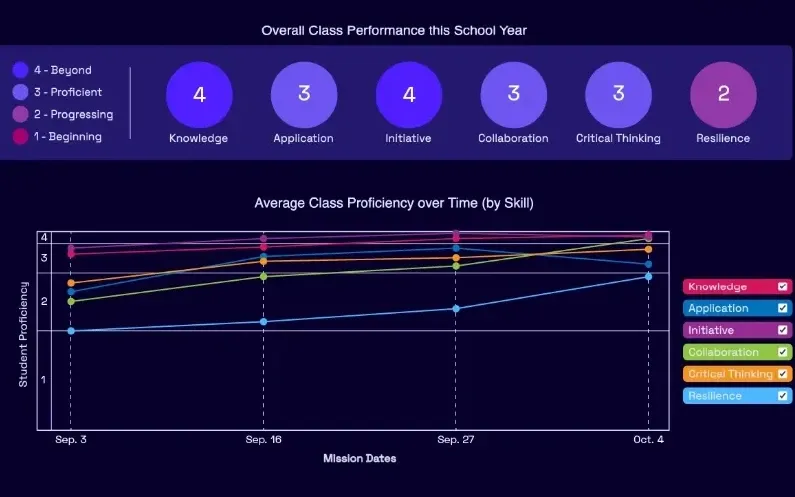
    A Mission.io class report: the class score in each of six skills, from knowledge and application to collaboration, critical thinking, and resilience, with the class chart across the year below.
    A class report from a real Mission: the class score in each of six skills, then each skill across the year.

    Every Mission produces a report for every student, built from what that student did across the whole Mission, on the skills the Mission captured. The six it can capture are Knowledge, Application, Initiative, Collaboration, Critical Thinking, and Resilience. The first two are what a test already sees. The other four are the human skills every school promises. The test shows what they know. The report shows the rest. SEE THE EVIDENCE →

    You taught it. Now find out who can use it.

    Who's behind it

    Mission.io is a research and design organization with one job: make collaborative, active learning something a teacher can run every unit instead of once a semester, and put a report in your hands when it’s over. Over a million students have run a Mission. The research behind them is funded by the National Science Foundation and the U.S. Department of Education’s Institute of Education Sciences, and Mission.io meets ESSA Level II standards, as validated by Instructure.

    Grades 3 to 5 CSTA standards this page teaches

    Six of the 21 CSTA computer science standards for grades 3 to 5, each beside the activity on this page that teaches it. Each code links to CSTA’s table of the 2017 standards.

    The six standards this page teaches

    Packets, comparing programs, loops and events, decomposition, debugging, and team roles.

    The grades 3 to 5 CSTA standards this page teaches, with the activity for each.
    The standardOn this page
    1B-NI-04 Model how information is broken down into smaller pieces, transmitted as packets through multiple devices over networks and the Internet, and reassembled at the destination.On this page: 2. The packet relay
    1B-AP-08 Compare and refine multiple algorithms for the same task and determine which is the most appropriate.On this page: 1. The cup robots, round two
    1B-AP-10 Create programs that include sequences, events, loops, and conditionals.On this page: 4. A Scratch animation or game
    1B-AP-11 Decompose (break down) problems into smaller, manageable subproblems to facilitate the program development process.On this page: 1. The cup robots
    1B-AP-15 Test and debug (identify and fix errors) a program or algorithm to ensure it runs as intended.On this page: 1. The cup robots
    1B-AP-16 Take on varying roles, with teacher guidance, when collaborating with peers during the design, implementation, and review stages of program development.On this page: 1. The cup robots’ four roles

    The Missions for this grade

    Cyber Defense Force, on phishing, is the one Mission in this table. None lists a CSTA code.

    The Mission that runs at 5th grade, with what it does.
    NumberMissionTopic (code)Minutes
    7Cyber Defense ForceIdentify phishing scams to protect a planetary defense system from hacker infiltration37
    START FREEMISSION BRIEF →

    Free teacher account, no card. Start with the Communication Mission, marked Start here in your library, then Cyber Defense Force, each after its 5-minute Teacher Preview.

    Also at this grade

    The 5th grade STEM activities page lists the grade’s Missions in every subject; the 5th grade engineering activities and 5th grade math activities pages map those subjects’ standards; and the 4th grade technology activities page rebuilds conditionals with cards, and Extraction, a 4th grade science Mission, has a class encode and decode a secret message with patterns.

Questions 5th grade technology teachers ask

Which 5th grade computer science standards does this page teach?

Six of the CSTA standards for grades 3 to 5 (level 1B), each with its activity: 1B-NI-04 packets, 1B-AP-08 comparing programs, 1B-AP-10 loops and events, 1B-AP-11 decomposition, 1B-AP-15 debugging, and 1B-AP-16 team roles. They’re CSTA’s 2017 standards, the ones Code.org’s lessons cite. CSTA released new PK-12 standards in 2026.

What technology skills should a 5th grader have?

On this page, 5th graders break a problem into parts before they program it, compare two programs written for the same job, test and debug, build with loops and events, work in a team role, and model how a message travels in packets. Those are six of CSTA’s computer science standards. The ISTE Standards for Students name seven broader skills: Empowered Learner, Digital Citizen, Knowledge Constructor, Innovative Designer, Computational Thinker, Creative Communicator, and Global Collaborator. Common Sense Education covers searching safely for free, and CS Unplugged has free computer science you can run without a screen.

Is there a Mission for coding?

Not at this grade. The one computer science Mission here is Cyber Defense Force, on spotting phishing, and it runs from 4th grade through 12th. The cup robots and Scratch carry the programming standards.

How do I grade a coding activity fairly?

Grade the plan and the behaviors, not the tallest stack. The decomposition box and the audit line are one grade: did the plan match the program, and can the Auditor show where it broke? The four-behavior tally over two or three activities is the other. A team whose robot froze twice and whose Auditor found both bugs is doing the standard.

Does Cyber Defense Force line up with my state's standards?

It lists one state set, Florida’s Next Generation Sunshine State Standards, and no CSTA or ISTE code.